
Guide
Christmas AI photo prompts: adapt a portrait style into a holiday look
To build Christmas AI photo prompts, start from a portrait style you already use and change only a few details. Add a knit or scarf, soft string lights in the background and one small prop, all in a restrained palette. Keep your face instruction, light and framing as they are. This page is a guide to adapting looks for the season, not a Christmas collection. Results depend on your tool and photo, and none are promised.
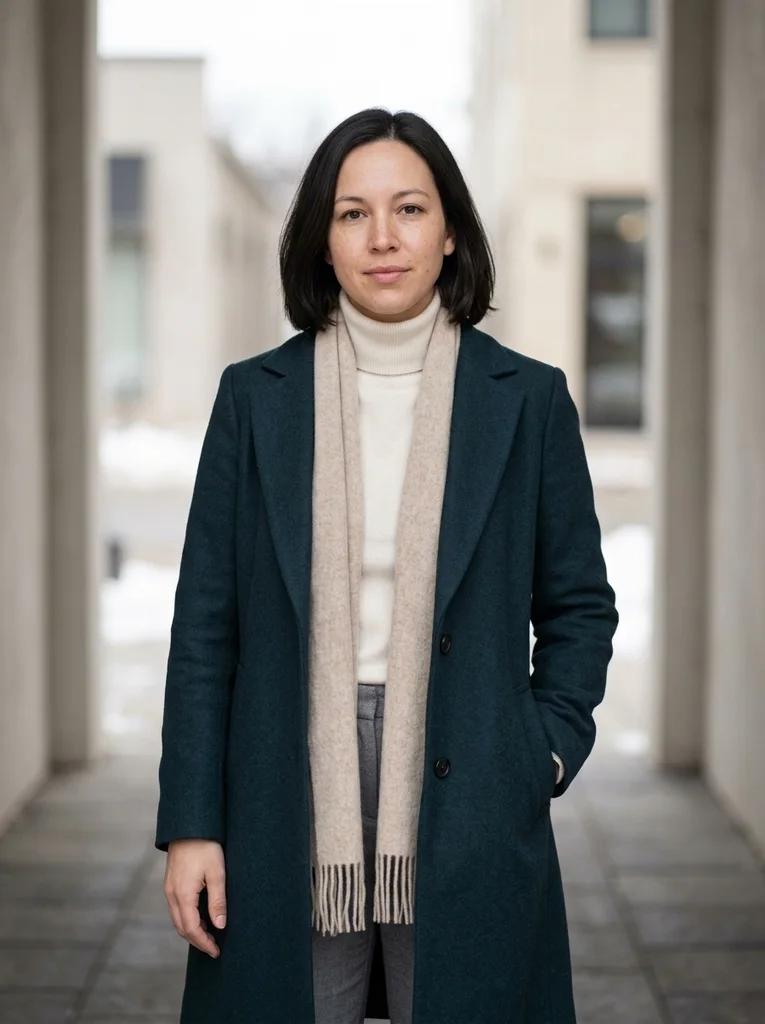
Start from a portrait style you already use
A holiday look is easiest to build on a style that already works for your photo. The light, framing and face instruction are settled, so you only change the wardrobe and a few details. Window-lit and café styles tend to need the fewest changes, because they already include soft daylight and warm interiors. Winter styles bring the knitwear, but their outdoor settings need more changes.
Copy the prompt you used for that style and keep its identity line and framing. Add only a few things: the clothes, background string lights and one prop. Each addition can pull the face away from your photo, so add slowly.
Holiday photo ideas for AI portraits: knitwear and scarves
Texture says winter without a costume. Choose a chunky or fine-gauge knit, a wool coat, or a plain scarf worn low enough that your chin and mouth stay visible. Name the fabric and the color, for example a cream cable-knit sweater or an oatmeal wool scarf.
Keep the palette restrained: two or three colors that sit well together. Deep green with cream, burgundy with oatmeal, navy with ivory and charcoal with camel are calm combinations. Skip novelty sweaters with printed reindeer or text, which can come out messy.
Add warm string lights and keep the window light soft
Warm string lights suit a holiday portrait when they stay in the background as soft, out-of-focus points of light. Ask for string lights behind you, blurred, and say that the light on your face stays soft and neutral. That helps keep the warm light in the scene rather than on your skin.
If your base style uses window light, keep it pale and soft, like a cloudy winter afternoon. If your source photo already has window light, keep its direction, so the face is lit the same way once the holiday details are added.
Add one prop and keep the frame uncluttered
One small prop is enough: a mug on the table or held low with your fingers in view, a wrapped gift in plain paper, or a few evergreen sprigs on a table. Say where it sits and what it is, and keep readable text or logos off it, because tools can garble lettering.
Clutter is the main risk. Piles of ornaments, a full tree behind you, heavy snowfall and glitter effects compete with the face and make errors more likely. Keep the background simple, and check the hands and edges before you save a result.
Keep the face natural and avoid holiday clichés
Keep the identity sentence first, exactly as in your base prompt, and ask for natural skin color and texture. Skip words such as glowing, sparkling or festive makeup, which can change the face itself. Keep the expression close to your source photo.
Common clichés include Santa hats, antler headbands, a snow globe effect and fake snow falling across the face. Use them only for a playful card, and then check that a hat does not hide your forehead or hair. For a calm portrait, let color and texture do the work.
A short checklist before you run the prompt
Run through these points once, then check the result against your original. No checklist can promise a particular result, so change one item at a time if something looks off.
- A base style you already use, with its light and framing kept
- The face and hair instruction still comes first
- One knit or scarf, and a palette of two or three colors
- String lights only behind you, soft and out of focus
- One prop with no text or logos
- Natural skin color, with no orange or red cast
- A simple background and clear hands
FAQ
Common questions.
01Can I turn any portrait style into a Christmas look?
Most styles can take holiday details, but calm indoor styles need the fewest changes, and winter styles already bring the knitwear. A beach or summer look needs a new setting and clothes. More of the image is redrawn, so the face is more likely to drift.
02How do I get string-light bokeh without a colored face?
Ask for string lights behind you as soft, out-of-focus points. State that your face is lit by soft, neutral window light with natural skin color. If the skin still looks orange, reduce the warm wording and rerun.
03Should I add a Santa hat in an AI Christmas portrait?
Only for a playful result. A hat can cover your forehead and hairline, which makes the face harder to keep. If you want one, ask for a plain hat and compare the face with your original.
04Can I use a Christmas prompt for a family or group photo?
Single portraits are the safer choice, and FrameGloss prompts describe one person. In a group each face gets fewer details, so changes to the faces are more likely. You can make separate portraits in the same style and place them side by side in a card layout.
05Can I print an AI Christmas portrait on a holiday card?
Check the file first. Zoom in to see whether skin, hair and edges stay sharp at the size you plan to print. Print a small test if you can. Results vary by tool, so sharpness at print size is not certain.
Keep exploring.
A little inspiration.
On the house.
10 free photo prompts, with examples and instructions. A small edit for your next photo, ready for your own image tool.
No account or payment needed.
Get the library
Your next look
starts here.
$5.99 / month
New looks and refined prompts, added regularly.
Included while your subscription is active.
- 500+ ready-to-copy photo prompts
- 20 curated collections with before-and-after examples
- New looks & ongoing prompt improvements
- Save favorites & revisit your looks
Renews monthly at $5.99.
Cancel renewal anytime. Image-tool fees separate.